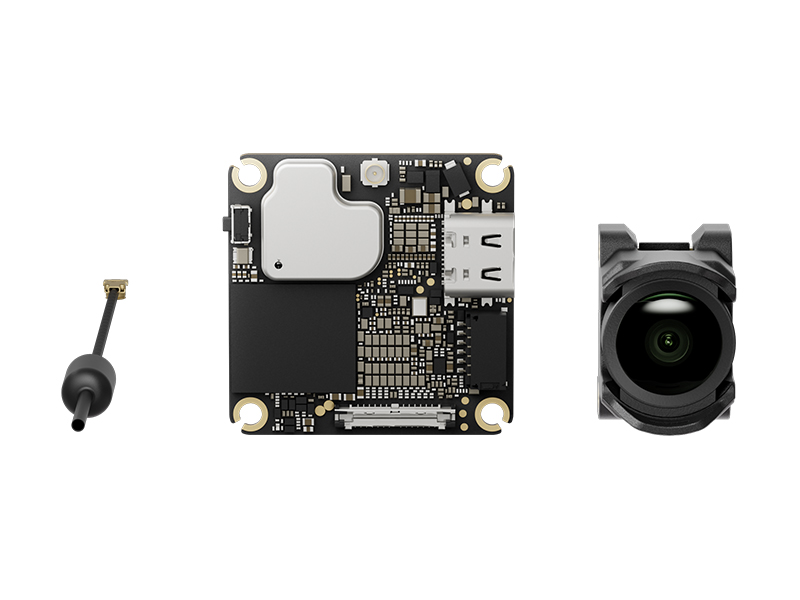
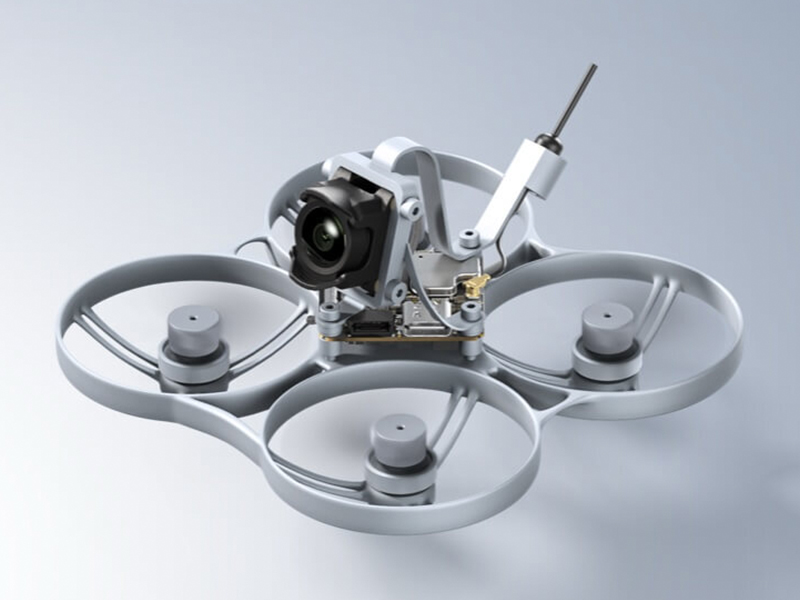
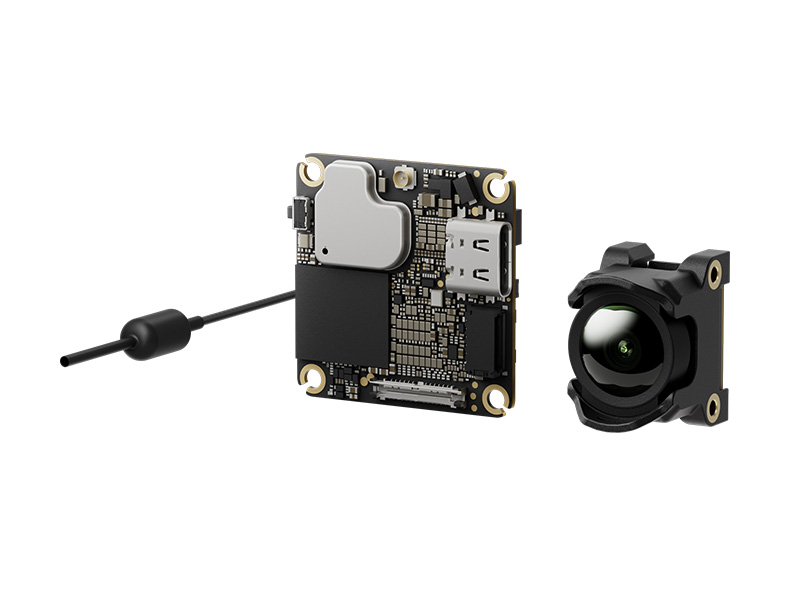
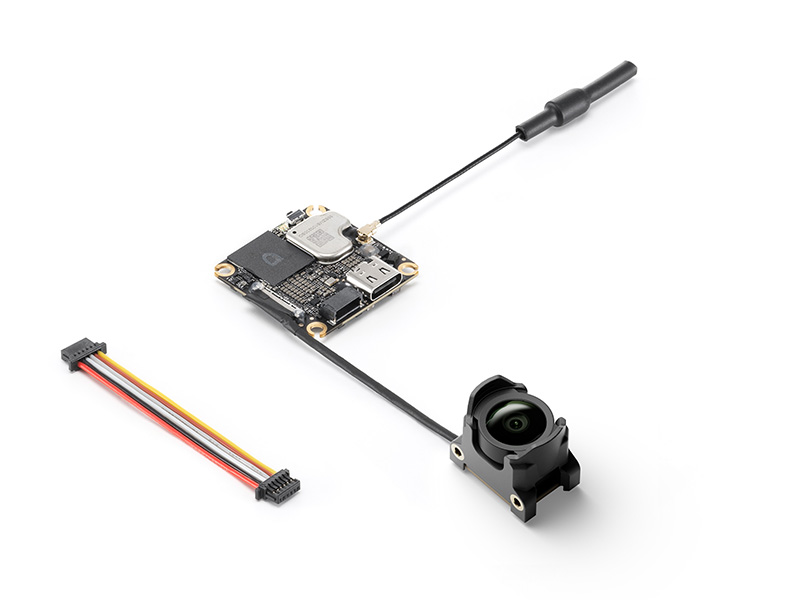
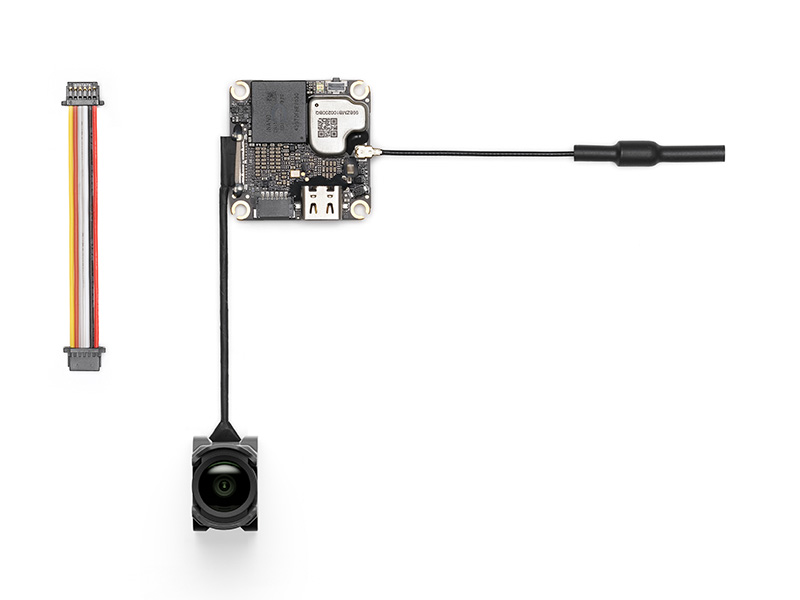
DJI O4 Wide Air Unit is a compact FPV camera and video transmission system ideal for custom builds and freestyle FPV flight.
4K/60fps
Video
159°
Field of View
20 ms
Low Latency
13g
Weight
23gb
Storage
Capture More
Unlock freedom in flight with the DJI O4 Wide Air Unit FPV Video Transmission System. Delivering unparalleled performance, the O4 Wide Air Unit is straight business, supporting 4K/60fps video capture and full HD video transmission up to 10km via DJI O4 video transmission technology.
Compatible with drone frames sized 3 inches and below, the O4 Wide Air Unit presents the cutting edge in video technology for custom-build FPV.
Designed for custom FPV drone builds
Ultra-immersive 159° field-of-view imaging
Suitable for fast, compact FPV drone frames
Seamless connectivity with DJI FPV peripherals for Goggles and Controllers
Small but Mighty
With a compact design weighing just 13.3 grams, O4 Wide Air Unit supports ultra-fast drone frames, delivering quality performance without any bloat. Simply install it on a compatible drone frame and transform your build into a pro-level drone.
A New Perspective
Say goodbye to bulky action cameras and mounts with O4 Wide Air Unit's integrated camera module that makes capturing share-worthy FPV footage easy.
Powered by a 1/2-inch CMOS sensor supporting 4K/60fps capture, O4 Air gives FPV pilots a 159° field of view for a broader, more immersive flight view,
Upgraded Imaging
With a 159° ultra-wide FOV, easily navigate through complex terrains and capture breathtaking flight footage.
Ultra-Wide FOV
With a 159° ultra-wide FOV, easily navigate through complex terrains and capture breathtaking flight footage.
Reliable Transmission
With its dual-antenna design, the unit delivers true-to-life 1080p/100fps H.256 live view quality with a transmission latency as low as 15 milliseconds, allowing you to make quick, real-time flight decisions with ease.
Enjoy a transmission range up to 10 km with a video transmission bitrate up to 60 Mbps.
For pilots flying in racing or high-movement environments, that low-latency link is the feature that matters most. It is the difference between simply seeing the flight and feeling connected to it. No matter where you fly, you can rely on O4 Air Unit Pro’s incredible transmission for responsive controls.
Ready to Race
Did someone say speed?
With dynamic Racing Mode supported by ultra-low video latency, up to eight aircraft with DJI O4 Air Unit Series can race simultaneously.
Fly Your Way
DJI O4 Wide Air Unit supports the premium DJI peripherals you already own.
Take off with DJI Goggles series headsets including DJI Goggles 3 and DJI Goggles N3 while executing precise flight manoeuvres with DJI FPV Remote Controller 3.
Specifications
Weight
Air Unit (camera module excluded): Approx. 5.1 g
Air Unit (camera module included): Approx. 13.3 g
Antenna: Approx. 0.75 g
Dimensions
Transmission Module: 30×30×6 mm (L×W×H)
Camera Module: 20.5×14×20.5 mm (L×W×H)
Coaxial Cable: 50 mm
3-in-1 Cable: 50 mm
Antenna: 80 mm
Operating Frequency
5.170-5.250 GHz
5.725-5.850 GHz
Operating frequency allowed varies among countries and regions. Please refer to local laws and regulations for more information.
Transmitter Power (EIRP)
5.1 GHz: <23 dBm (CE)
5.8 GHz:
<30 dBm (IC)
<14 dBm (CE)
<30 dBm (SRRC)
Lowest Latency
With DJI Goggles 3 and racing mode enabled:
With 1080p/100fps video transmission quality, the latency is as low as 20 ms.
With DJI Goggles N3 and racing mode enabled:
With 1080p/100fps video transmission quality, the latency is as low as 24 ms.
With DJI Goggles 2 or Goggles Integra:
With 1080p/100fps video transmission quality, the latency is as low as 35 ms.
Latency data refers to the minimum latency during the screen refresh of the goggles. Tested in an outdoor open environment without interference. The video transmission latency data varies with different devices.
Max Video Transmission Range
Up to With DJI Goggles 3/DJI Goggles N3:
Up to 10 km (IC), 6 km (CE), 6 km (SRRC)
Measured in an unobstructed outdoor environment free of interference. The above data shows the farthest communication range under various standards. The actual maximum communication range during flight is limited by the flight endurance of the aircraft. Always pay attention to RTH reminders on the camera view during your flight.
The flight control firmware needs to be configured to support the SBUS protocol in order to use the DJI FPV remote controller.
FAQ
The DJI O4 Air Unit Series includes three products, all equipped with the DJI O4 video transmission system. Compared to the previous generation, these products deliver a new experience with lower latency, longer range, and more ways to play.
DJI O4 Wide Air Unit is an upgrade to DJI O4 Air Unit, mainly featuring a wider 159° FOV. Keeping the original lightweight design, HD image quality, and powerful O4 video transmission, it is ideal for beginners and FPV freestyle users.
DJI O4 Air Unit is compact and lightweight, with a mounting hole distance of 30 × 30 mm, a height of only 6 mm, and a weight of just 8.2 grams, making it ideal for beginners in the FPV drone community. DJI O4 Air Unit is perfectly compatible with 2-inch and smaller frames, and it is also suitable for installation on racing frames for practice. It features a 1/2-inch image sensor, capable of shooting up to 4K/60fps video, with a minimum transmission latency of 20 milliseconds and a maximum transmission distance of 10 kilometers. Additionally, it comes with 23GB of built-in storage, making it an excellent choice for FPV freestyle flying and beginners, offering outstanding value for its price.
DJI O4 Air Unit Pro is powerful and an ideal choice for FPV users. It is compatible with frames of 3 inches and above, including professional FPV such as the X8. DJI O4 Air Unit Pro is equipped with a 1/1.3-inch image sensor, capable of shooting up to 4K/120fps video, and supports 10-bit D-Log M color mode. It is compatible with the same ND filters as DJI Avata 2, providing ample flexibility for professional shooting and post-production. When the racing mode is activated, the minimum transmission latency can reach 15 milliseconds, and the maximum transmission distance can reach 15 kilometers. Whether flying in a specific area or on a long-distance flight, it provides users with an exceptional flying experience.
The DJI O4 Air Unit Series has introduced a racing mode feature, which can fix the recording and video transmission specifications at 1080p/100fps, set the channel mode to manual mode, and is compatible with the racing frequency points used in analog video transmission, divided by Race Band. When using with other racing drones that use analog video transmission, it is recommended to keep the goggles at least one meter apart, manually select the distribution frequency, and adjust the appropriate video transmission power accordingly.
The DJI O4 Air Unit Series and DJI O3 Air Unit only support partial accessory compatibility. Please carefully check the accessory compatibility list before purchasing, or consult DJI Support.
Shared accessories include: 3-in-1 cable*, video transmission antenna (only for DJI O4 Air Unit Pro).
Non-shared accessories include: camera module, image transmission module, ND filter set, camera coaxial cable.
The DJI O4 Air Unit Series has significantly improved cooling capabilities compared to the DJI O3 Air Unit.
After enabling the ground low-power mode, the DJI O4 Air Unit and DJI O4 Wide Air Unit can remain on standby for up to 2.5 minutes*, and the DJI O4 Air Unit Pro can remain on standby for up to 20 minutes*.
If you do not need to record videos while on standby on the ground, it is recommended to keep the low power mode on.
If the ambient temperature significantly exceeds 25° C, it is recommended to use external cooling methods to help dissipate heat for the Air Unit.
No.
The DJI O4 Air Unit Series supports adjusting flight controller parameters, but the flight controller should support Canvas mode.
No.
No.
The dimensions of the transmission module and camera module of the DJI O4 Air Unit Series are different from those of the DJI O3 Air Unit. Please adjust the frame according to the corresponding dimensions of the DJI O4 Air Unit Series before installation.
Yes. Currently, the replaceable accessories include: DJI O4 Air Unit transmission module, camera module, and antenna.
Please purchase related accessories at DJI Store, and follow the tutorial video for replacement.
I. Installation and Debugging Instructions:
1. The DJI O4 Air Unit Series standby time on the ground (with ground low power mode enabled): 3 minutes (ambient temperature 25° C). O4 Air Unit Pro standby time on the ground (low power mode enabled): Maintain thermal balance (ambient temperature 25° C).
2. When assembling the DJI O4 Air Unit Series, ensure that the image transmission RX is connected to the flight controller TX, and the image transmission TX is connected to the flight controller RX.
3. The DJI O4 Air Unit Series has two sets of temperature control strategies for the standby state and the flight state. It can apply different temperature control strategies according to the current state.
a. In the standby state, the protection system will be activated to automatically shut down the air unit when the temperature threshold is exceeded.
b. If the temperature threshold is exceeded during flight, an over-temperature warning will be displayed, and recording will stop. If the temperature continues to rise, the transmission bitrate will decrease, with a maximum of 50 Mbps.
II. Installation Suggestions:
1. The basic principle is to facilitate heat dissipation.
2. When routing the cables, please do not bend, twist, or bind the camera coaxial cable forcefully. Especially avoid folding the base of the coaxial cable at an angle greater than 90°, to prevent damage to the coaxial cable and issues such as screen flickering.
3. It is recommended to install the air unit in a position close to the propellers (distance between the air unit and the propellers within 10 mm), so that the downwash airflow can be effectively utilized. Try to avoid an installation position far from the propellers.
4. It is recommended to use a heat conductive material to connect the frame and the air unit. This will dissipate heat to the carbon plate and the other non-conductive metal components of the frame. Conducting heat will extend the operating time.
5. Do not install the air unit in an enclosed area.
6. After the air unit is powered on, its metal shell will become hot. Therefore, the air unit should not be installed in a position easily accessible or held by hand.
7. Please do not forcefully tighten the screws on the drone body to avoid stripping the threads.
Mechanical vibration at certain frequencies may cause abnormal EIS performance of DJI O4 Air Unit Series. The causes are as follows:
I. IMU Resonance
The usual ESC PWM control frequency is 24 kHz by default, and the camera IMU frequency is approximately 24-30 kHz. If there is no effective vibration absorbing measure, the motor vibration may be transmitted to the camera IMU, causing resonance because the frequencies coincide. The resonance will affect the IMU data accuracy and EIS performance of the video stabilization application.* As a result, the processed video image shakes, but the live view image is not affected. Usually, frames with TPU or vibration absorbing rubber are not prone to IMU resonance.
II. Propeller Vibration
If the rolling shutter effect appears in both the live view and the video image, it is usually because the propeller vibration (frequency is approximately a few hundred Hz) is transmitted to the camera through the aircraft frame.
Follow the steps below to troubleshoot and fix the image stabilization issue:
Rule out the IMU resonance issue.
1. Remove the propellers from the aircraft. Make sure that the camera is securely mounted and the aircraft is placed in a stationary position on the ground. Then, enable RockSteady and start recording.
2. Start the motors and slowly push the throttle to the full throttle position. Observe the live view in the goggles. If the live view is not shaking, stop the motors and stop recording. Otherwise, check the camera and make sure that it is securely mounted.
3. Export the recorded video and check it. If the video image shakes, the issue is most likely caused by the resonance between the frame and the camera IMU.
In this case, refer to the following solutions:
a. Change the ESC PWM control frequency to 48 kHz or 96 kHz and test again.
b. If the video image shakes after solution a is adopted, apply a softer vibration absorbing structure between the camera and the aircraft frame. Repeat the above testing procedures until the video image does not shake.
After ruling out the IMU resonance issue, check if the video image has the rolling shutter effect caused by propeller vibration.
1. Install the propellers back and make sure that the propellers are not damaged. Fly the aircraft and start recording with RockSteady enabled.
2. Check the video image after the flight. If the video image does not have a rolling effect, the debugging is completed.
3. If the video image has a rolling shutter effect, try the following solutions:
a. Adjust the vibration absorbing structure between the camera and the aircraft frame again.
b. Adjust the tightness of the screws that fasten the camera to the aircraft frame.
If the issue still exists after all of the above methods are completed, contact DJI Support.
* Due to the significant weight difference between the DJI O4 Air Unit and the DJI O4 Air Unit Pro, the DJI O4 Air Unit requires a softer vibration damping structure compared to the DJI O4 Air Unit Pro to achieve the same effect.
The DJI O4 Air Unit Series supports Betaflight 4.3.0 and INAV 8.0.1, along with their respective later versions.
The DJI O4 Air Unit Series must be powered by the flight controller or battery to activate the transmission module.
Please ensure the video transmission channel is set correctly and check if the video transmission OSD is turned on.

 DJI Mavic 4 Pro Creator Combo (512GB)
 DJI Mavic 4 Pro Fly More Combo
 DJI Mavic 4 Pro
 DJI Care Refresh 1-Year Plan (DJI Mavic 3 Pro)
 DJI Care Refresh 2-Year Plan (DJI Mavic 3 Pro)
 DJI Care Refresh 1-Year Plan (DJI Mavic 3 Pro Cine)
 DJI Care Refresh 2-Year Plan (DJI Mavic 3 Pro Cine)
 DJI Mavic 3 Series 100W Battery Charging Hub
 DJI Mavic 3 Series Intelligent Flight Battery
 DJI Mavic 3 Classic Storage Cover
 DJI Power SDC to DJI Mavic 3 Series Fast Charge Cable
 DJI Mavic 3
  DJI Mavic 3 Fly More Combo
  DJI Mavic 3 Cine Premium Combo (Open Box)
 Mavic 2 Zoom (Drone Only)
 Mavic 2 Pro (Drone Only, No Battery)
 Ex-Demo Mavic 2 Zoom
 Mavic 2 Pro
 CrystalSky Mavic/Spark Remote Controller Mounting Bracket
 D1 Aircraft Sleeve
 SunnyLife Low-Noise Propellers for Mavic Pro (2 Pairs)
 Mavic Pro Fly More Combo
 DJI Air 3S Fly More Combo w. DJI RC 2
 DJI Air 3S
 DJI Air 3S Fly More Combo w. DJI RC-N3
 DJI Air 3 Fly More Combo w. DJI RC 2
 DJI Air 3 Fly More Combo
 DJI Air 2S Fly More Combo
 DJI Mini Shoulder Bag
 GPC Safety Case V2 for Mavic Air 2
 Mavic Air 2 Battery to Power Bank Adaptor
 DJI RC-N Series Remote Controller Monitor Hood
 Mavic Air (Arctic White)
 DJI Mini 5 Pro Fly More Combo
 DJI Mini 5 Pro Fly More Combo Plus
 DJI Mini 5 Pro
 DJI Mini 5 Pro Fly More Combo w. DJI RC-N3
 DJI Mini 4 Pro Fly More Combo (Refurbished)
 DJI Mini 4 Pro Fly More Combo Plus (Refurbished)
 DJI Care Refresh 1-Year Plan (DJI Mini 3)
 DJI Care Refresh 2-Year Plan (DJI Mini 3)
 DJI RC
 DJI Mini 4 Pro/Mini 3 Series Two-Way Charging Hub
 DJI Care Refresh 1-Year Plan (DJI Mini 2 SE & DJI Mini 4K)
 DJI Care Refresh 2-Year Plan (DJI Mini 2 SE & DJI Mini 4K)
 PGYTECH Lens Hood for DJI Mini Series
 DJI Mini 2 / SE Intelligent Flight Battery
 DJI Mini 3 Pro w. DJI RC
  DJI Mini 3 Pro (Drone Only, No Battery)
 PGYTECH Control Stick Protector for Mavic Mini
 Mavic - RC Cable (Reverse Micro USB connector)
 Mavic - RC Cable (Standard Micro USB connector)
 Mavic Mini Remote Controller (open box)
 DJI Lito X1 Fly More Combo
 DJI Lito X1 Fly More Combo Plus
 DJI Lito X1
 DJI Lito X1 Fly More Combo (DJI RC-N3)
 DJI Lito 1
 DJI Lito 1 Fly More Combo
 DJI Flip
 DJI Flip w. DJI RC 2
 DJI Flip Fly More Combo
 DJI Care Refresh 1-Year Plan (DJI Flip)
 DJI Care Refresh 2-Year Plan (DJI Flip)
 DJI RC 2
 DJI RC-N3 Remote Controller
 D1 Labs 100W Braided USB-C Cable
 D1 Labs Lunar Glow USB-C Cable
 DJI RC/RC 2 Control Sticks
 D1 Labs Screen Protector for DJI RC Series
 D1 Labs Monitor Hood for DJI RC-N Series
 D1 Labs Lanyard Kit for DJI RC-N Series
 SunnyLife Bicycle Mount for DJI RC-N Series
 Freewell Pro Card Reader (CF A/B, SD, TF)
 D1 Labs High-Speed SD Card Reader
 DJI Neo 2 Fly More Combo
 DJI Neo 2 Motion Fly More Combo
 DJI Neo 2 (Drone Only)
 DJI Neo 2 Fly More Combo (Drone Only)
 Ex-Demo DJI Neo Fly More Combo
 Ex-Demo DJI Neo Motion Fly More Combo
 DJI Neo Fly More Combo
 Ex-Demo DJI Neo
 DJI Avata 360 Fly More Combo
 DJI Avata 360 Motion Fly More Combo
 DJI Avata 360 (Drone Only)
 DJI Avata 360 w. DJI RC 2
 DJI Avata 2 Fly Smart Combo
 DJI Avata 2 Fly Smart Combo (Three Batteries)
 DJI Avata 2 Fly More Combo
 DJI Avata 2 Fly More Combo (Three Batteries)
 DJI FPV Goggles V2 Motion Combo
 DJI Goggles 3
 DJI Goggles N3
 DJI O4 Wide Air Unit
 DJI O4 Air Unit
 DJI O4 Air Unit Pro
 DJI Avata (Drone Only, No Battery)
 DJI Avata Intelligent Flight Battery
 DJI Avata Propeller Guard
 SunnyLife Propeller Guard Protector for DJI Avata
 DJI O3 Air Unit
 DJI FPV Remote Controller 3
 DJI O3 Air Unit 3-in-1 Cable
 DJI FPV Combo
  Osmo Pocket 4 Standard Combo
 Osmo Pocket 4 Creator Combo
 Osmo Action 6 Standard Combo
 Osmo Action 6 Adventure Combo
 DJI Mic Mini 2 Dual Microphone Combo
 DJI Mic Mini 2 Single Microphone Kit
  DJI Mic Mini 2 Dual Microphone Combo (Mobile)
 DJI Mic Mini 2 Single Microphone Kit (Mobile)
 Osmo Nano Standard Combo (64GB)
 Osmo Nano Standard Combo (128GB)
 Osmo 360 Standard Combo
 Osmo 360 Adventure Combo
 Osmo Mobile 8P Standard Combo
 Osmo Mobile 8P Advanced Tracking Combo
 Osmo Mobile 8P Creator Combo
 Osmo Mobile 8 Advanced Tracking Combo
 Osmo Pocket 3 Standard Combo
 Osmo Pocket 3 Creator Combo
 Osmo Pocket 3 (Refurbished)
 Osmo Pocket 3 Creator Combo (Refurbished)
 Osmo Action 5 Pro Standard Combo
 Osmo Action 5 Pro Adventure Combo
 DJI Mic 3 Dual Microphone Combo
 DJI Mic 3 Single Microphone Kit
 Osmo Action 4 Standard Combo
 Osmo Action 4 Adventure Combo
 DJI Mic 2 Single Microphone Kit
 DJI Mic 2 Transmitter (Pearl White)
 DJI Care Refresh 2-Year Plan (DJI Pocket 2)
 Osmo Pocket 3.5mm Adapter
 DJI Care Refresh 1-Year Plan (Osmo Action 3)
 DJI Care Refresh 2-Year Plan (Osmo Action 3)
 Osmo Action Carrying Bag
 Osmo Action 60m Waterproof Case
 DJI Action 2 Dual Screen Combo
 DJI Osmo Action
  Osmo Pocket
 DJI RS 5
 DJI RS 5 Combo
 DJI RS 4 Pro Combo (2026)
 DJI RS 4 Mini
 DJI RS 4 Mini Combo
 DJI RS 4
 DJI RS 3 Mini
 DJI RS 3
 DJI RS 3 Pro
 DJI RS 2
 DJI RS 2 Pro Combo
 DJI RSC 2
 DJI RSC 2 Pro Combo
 Ronin-S
 Ronin-SC
 Ronin 4D-6K
 Ronin 4D-8K
 DJI Inspire 3 Basic Package
 DJI Inspire 3
 DJI Focus Pro Creator Combo
 DJI Focus Pro All-In-One Combo
 DJI Transmission (High-Bright Monitor Combo)
 DJI Transmission (Standard Combo)
 DJI Video Transmitter
 DJI Video Receiver
 DJI SDR Transmission Combo
 DJI SDR Transmission Receiver
 DJI SDR Transmission Transmitter
 Inspire 2
 Ex-Demo Inspire 2
 DJI Power 1000 Mini
 DJI Power 2000
 DJI Power 1000 V2
 DJI Power 1000 Portable Power Station
 DJI Power Expansion Battery 2000
 DJI Power 1000 Protective Storage Bag
 DJI Power Dongle
 IBCPOWER 100W Foldable Solar Panel
 DJI Power Series Hand Truck
 DJI Power MC4 to XT60 Solar Power Cable
 DJI Power SDC to DJI Inspire 3 Fast Charge Cable
 DJI Power SDC to Car Charger Plug Power Cable (12V)
 Zignes 120W Solar Panel
 DJI Power SDC to Matrice 30 Series Fast Charge Cable
 DJI ROMO S (Water Tank Version)
 DJI ROMO P (Water Tank Version)
 DJI ROMO A (Water Tank Version)
 ROMO Accessory Kit
 ROMO Cleaning Solution
 ROMO Side Brush
 ROMO Mop Pad
 Matrice 30T Dock Bundle
 NextCore RN50 Drone LiDAR
 Cendence-S Remote Controller For M200 V2 Series
 Zenmuse H30T
 ParaZero SafeAir Parachute for Matrice 30 Series
 ParaZero SafeAir Parachute for DJI Mavic 3 Series (ASTM Compliant)
 Zenmuse H30
 DJI Dock 2
 DJI Matrice 4E
 DJI Matrice 4T
 DJI Matrice 4D
 DJI Matrice 4D Combo
 DJI Matrice 4TD
 DJI Matrice 4TD Combo
 DJI Matrice 400
 DJI Dock 3
 DJI Mavic 3 Thermal Advanced
 DJI Mavic 3 Multispectral
 DJI FlyCart 30
 DJI FlyCart 100
 Zenmuse L2
 Zenmuse P1
 Phase One P3 Payload (iXM 120MP) with 80mm AF
 Deepthink S2 Pro Night Vision Payload
 Mavic 2 Enterprise Advanced
 Matrice 30T
 Matrice 300 RTK
  Deepthink S2 Night Vision Payload for Matrice 300 Series
 Zenmuse H20T
  DJI Care Enterprise Plus (DJI Matrice 400)
 DJI Care Enterprise Plus (DJI Matrice 4E)
 DJI Maintenance Program Basic Service (Matrice 300 RTK)
 DJI Maintenance Program Standard Service (Mavic 2 Series)
 DJI Maintenance Program Standard Service (Matrice 300 RTK)
 DJI AGRAS T100
 DJI AGRAS T70P
 AGRAS T50
 DJI RC Plus for AGRAS Series
 DJI AGRAS T25P
 AGRAS T25
 Ex-Demo AGRAS T40 (Drone Only, No Batteries)
 DJI AGRAS T30 (Excluding Batteries)
 X2D II 100C
 907X & CFV 100C
 XCD 45P
 XCD 2,5/25V
 XCD 2,5/38V
 XCD 2,5/55V
 UGREEN 65W Nexode S GaN Charger
 UGREEN 65W Nexode GaN II Charger
 LiPO Battery Safe Bag (Medium)
 D1 Labs USB-C Wrist Strap Cable
 DJI Care Refresh 1-Year Plan (DJI Mini 5 Pro)
 DJI Care Refresh 2-Year Plan (DJI Mini 5 Pro)
 D1 Labs Safety Case for DJI Mini 5 Pro
 DJI Mini 5 Pro Shoulder Bag
 DJI Care Refresh 1-Year Plan (DJI Neo)
 DJI Care Refresh 2-Year Plan (DJI Neo)
 DJI Care Refresh 1-Year Plan (Osmo Pocket 3)
 DJI Care Refresh 2-Year Plan (Osmo Pocket 3)
 D1 Labs Carry Case for Osmo Pocket 3
 Osmo Pocket 3 Carrying Bag
 DJI Care Refresh 1-Year Plan (Osmo Mobile 7P)
 DJI OM 7 Series Tracking Kit
 Osmo 1.6m Tripod Selfie Stick
 DJI OM Magnetic Phone Clamp 5
 DJI Care Refresh 1-Year Plan (Osmo Mobile 7)
 DJI OM 7 Series Magnetic Phone Clamp
 DJI Care Refresh 1-Year Plan (DJI RS 4 Mini)
 DJI Care Refresh 2-Year Plan (DJI RS 4 Mini)
 DJI RS Enhanced Intelligent Tracking Module
 DJI RS Intelligent Tracking Module
 DJI Care Refresh 1-Year Plan (DJI Mini 4 Pro)
 DJI Care Refresh 2-Year Plan (DJI Mini 4 Pro)
 DJI Care Refresh 1-Year Plan (DJI Air 3S)
 DJI Care Refresh 2-Year Plan (DJI Air 3S)
 DJI RC Pro 2
 DJI Care Refresh 1-Year Plan (DJI RS 4)
 DJI Care Refresh 2-Year Plan (DJI RS 4)
 DJI Care Refresh 1-Year Plan (Osmo Action 5 Pro)
 DJI Care Refresh 2-Year Plan (Osmo Action 5 Pro)
 D1 Labs Screen & Lens Protector for Osmo Action 5 Pro
 DJI Care Refresh 1-Year Plan (DJI Mavic 4 Pro)
 DJI Care Refresh 2-Year Plan (DJI Mavic 4 Pro)
 PGYTECH OneGo Air Backpack 25L | Obsidian Black
 D1 Labs Safety Case for DJI Mavic 4 Pro
 DJI Care Refresh 1-Year Plan (DJI RS 4 Pro)
 DJI Care Refresh 2-Year Plan (DJI RS 4 Pro)
 DJI Care Refresh 1-Year Plan (Osmo Action 4)
 DJI Care Refresh 2-Year Plan (Osmo Action 4)
 D1 Labs Camera Cage for Osmo Action 3/4/5 Pro
 DJI Mic 3 Receiver
 DJI Mic 3 Transmitter
 DJI Mic Series Mobile Receiver
 DJI Mic 3 Mobile Phone Adapter (Lightning)
 DJI Mic Series Carrying Pouch
 DJI Mic Mini Windscreen (Black & Grey w. Black Clip)
 DJI Mic Mini Multi-Color Windscreens
 DJI Care Refresh 1-Year Plan (Osmo Nano)
 DJI Care Refresh 2-Year Plan (Osmo Nano)
 D1 Labs Screen & Lens Protector for Osmo Nano
 Osmo 70cm Invisible Selfie Stick
 DJI Care Refresh 1-Year Plan (Osmo 360)
 DJI Care Refresh 2-Year Plan (Osmo 360)
 Osmo 360 Carrying Bag
 D1 Labs Screen Protector for Osmo 360
 UGREEN 130W USB-C Car Charger
 UGREEN 100W USB-C Charging Station
 UGREEN 45W 3-Port GaN Fast Charger
 UGREEN 35W Nexode GaN II Charger
 D1 Labs Landing Pad Pro (50CM)
 D1 Labs Landing Pad Pro (65CM)
 D1 Labs Landing Pad Pro (100CM)
 D1 Labs Weighted Drone Landing Pad (92 cm)
 D1 Labs Lanyard Bracket for DJI RC Series
 D1 Labs Screen Protector for DJI RC Pro
 SunnyLife Carrying Case for DJI RC Pro
  SunnyLife Protective Cover for DJI RC Pro
 D1 Labs Drone Safety Sign
 D1 Labs Retractable Safety Cone (450 mm)
 LiPO Battery Safe Bag (Large)
 Freewell All Day Filters for DJI Mini 5 Pro (6 Pack)
 Freewell ND64 Filter for Osmo 360
 Freewell Mega Filter Pack for Osmo Nano (12 Pack)
 Freewell ND16 Filter for Osmo 360
 Freewell Sherpa Series Glow Mist 1/4 Filter
 Freewell Galaxy Series Snow Mist 1/4 Filter
 Freewell Sherpa Series Case for iPhone 13 Pro
 Freewell Sherpa Series Case for iPhone 13 Pro Max
 Phantom 4 Pro V2.0 Remote Controller
  DJI RC Motion 3
 Cynova Protective Cover for DJI RC Pro 2
 D1 Labs Screen Protector for DJI RC Pro 2
 D1 Labs Lanyard Bracket for DJI RC Pro 2
 SanDisk Extreme Pro 128GB 200MB/s MicroSD Card
 DJI Care Refresh 1-Year Plan (DJI Air 3)
 DJI Care Refresh 1-Year Plan (Osmo Mobile 8)
 DJI Care Refresh 2-Year Plan (DJI RS 3 Mini)
 DJI Care Refresh 2-Year Plan (Osmo Mobile 8)
 DJI Care Enterprise Basic (Zenmuse L2)
 DJI Care Enterprise Basic (Matrice 350 RTK)
 DJI Care Enterprise Basic (DJI Mavic 3 Thermal Advanced)
 DJI Care Enterprise Basic (D-RTK 3 Multifunctional Station)
 DJI Care Enterprise Basic 2-Year Plan (D-RTK 3 Multifunctional Station)
 DJI Care Enterprise Basic 2-Year Plan (Zenmuse S1)
 DJI Care Enterprise Basic 2-Year Plan (Zenmuse V1)
 DJI Care Enterprise Basic 2-Year Plan (Zenmuse L2)
 DJI Care Enterprise Plus (Zenmuse L2)
 DJI Care Enterprise Plus (DJI Mavic 3 Thermal Advanced)
 DJI Care Enterprise Plus (Zenmuse L3)
 Ex-Demo DJI Mini 3 (DJI RC-N1)
 Ex-Demo Osmo Pocket 3 Creator Combo
 Ex-Demo DJI Neo 2 Fly More Combo (Drone Only)
 Ex-Demo DJI Neo 2 (Drone Only)
 DJI WB37 Battery Charging Hub
 SunnyLife Sun Hood for DJI RC Pro
 Ex-Demo Osmo Action 5 Pro Standard Combo
 Ex-Demo Osmo Mobile 7
 Ex-Demo DJI RS 4
 Ex-Demo DJI Mic Mini Dual Microphone Combo
 Ex-Demo DJI TB51 Intelligent Battery Charging Hub
 Ex-Demo DJI DL 35mm F2.8 LS ASPH Lens
 Ex-Demo Matrice 200 TB55 Intelligent Flight Battery
 Ex-Demo DJI DL 50mm F2.8 LS ASPH Lens
 Ex-Demo Mavic 2 Enterprise Zoom
 Ex-Demo DJI Matrice 4D
  Ex-Demo DJI Matrice 4D Combo
 Ex-Demo DJI Mavic 3 Enterprise Series Battery Kit
 Ex-Demo DJI DL-S 16mm F2.8 ND ASPH Lens
 Ex-Demo Zenmuse P1
 Ex-Demo Zenmuse X5S
 Ex-Demo Zenmuse X7
 Ex-Demo Wingsland Z15 Gimbal Spotlight